What i really liked about microsoft technologies is the availability of learning material, forum help, technical support, including videos, how-to's etc which is relatively less for other technologies.
Microsoft should really be appreciated in the extent of materials they provide for developers to learn their technologies.
What if you do not have the required infrastructure or software or licenses to install their stuff to learn - dont worry they have online hands on labs, all you need is a internet connection, and you can join a lab and login to a virtual server and you can configure and learn their stuff (only thing is you need a big monitor like i have at home, as once you are in a test lab, there are test instructions to read as well as to see the server desktop so it is kind of tough to do on a normal monitor).
I recently came across this excellent site which provides all the necessary material for a share point developer.
http://www.microsoft.com/click/SharePointDeveloper/
It has quick start papers, hands on labs and web casts to learn developing using sharepoint.
Sunday, June 29, 2008


Review of the uCertify training material for 70-300 Exam
- 70-300 exam is the Microsoft exam for Analyzing Requirements and Defining Solution Architectures.
- Recently i was requested to review uCertify training material and here i am presenting my feedback.
- This exam unlike other microsoft exams deals with the entire lifecycle of a project, the key exam objectives include right from the feasibility of the project, through design, requirements specification and elaboration and continues with the process definition and maintenance.
- If a person had already passed a microsoft exam one can easily understand that nowadays we need practical experience to pass the exam as microsoft has introduced lot of simulation and practical scenario based questions which cannot be cleared if one tries to
memorize or to study question banks. So one needs a proper blend of practical as well as theoretical knowledge to clear these exams. - At the same time practical experience alone is not enough and we do need to brush up some basics through study material, where kits like
ucertify come to help. - I am presenting here what i liked about this product.
Learn Exam Objectives along with Study Notes
- Main thing one needs to understand to pass MCP exams is we need to clearly understand the skills measured by the exam or the key objectives which are generally presented as topics and sub-topics in the preparation guides.
- Example:-
- Envisioning the Solution >> Develop a solution concept>> Analyze the feasibility of the solution. Most training material i had seen do not link material to key objectivies, ucertify did a pretty good job in this, as soon as you launch their tool, from their menu we can access the Exam Objectives via Notes >> Exam Objectives.
- What is still better is we can read study notes linked to exam objectives, by clicking on the objectives with notes menu. So now we have all the study notes per topic or sub-topic linked to the exam objectives which is very helpful when you want to revise the topics before appearing.
- Also the kit has a very good printing option, so that we can print and read the material.
Study Tips:
- The study tips are really useful, which list the pre-requisities for the exam, skills needed, what to practice and how to face the test, which are all inside the kit under the articles section. The articles section had very less articles and I felt for an exam of this nature the kit should have given more articles.
Flash Cards:
- Flash cards is a very good way of remembering key points while learning. I really like the flash card concept in the kit. 135 Flash card questions were present.
Test questions:
- The kit had diagnostic tests as well as practice tests. We can also create our own type of tests by selecting X questions from a pool of Y questions.
- Also the kit has option to test to see if there is a new version of material available on their site and if so we can download the update from their site.
Overall the kit from uCertify is really helpful to jump start ones preparation for the 70-300 exam and i would recommend it to any one planning to clear the exam.
Here is their website if you are looking for obtaining training material.

Thursday, May 24, 2007
Codeplex - Microsoft's answer for open source
I was amazed to see the list of open source microsoft projects available at code plex.
Some of the popular ones which we have been using like the Atlas and the Ajax extension sample controls are all from codeplex.
"CodePlex is Microsoft's open source project hosting web site. You can use CodePlex to create new projects to share with the world, join others who have already started their own projects, or use the applications on this site and provide feedback"
The license details are provided here,
Few projects which are very impressive are,
1) BlogEngine.Net - your own dot net blog engine
2) Scorm 2004 implementation for dot net
3) Sharepoint utilities
4) Sandcastle help file builder - for VS2005 IDE (very helpful)
5) Same Desk - brings desktop on the web (unlike silverlight i did not have to install anything to see those applications very impressive) snapshot attached below.
On SameDesk i open a calculator, was able to browse this blog and also search something on the map on the left hand side and the web page looks exactly like a desktop and the app looks like a windows application. :)
you can try this out here live - http://www.openspot.com/

Some implementations given above would take several months if teams were to start coding them from scratch and some i could not believe if it may be completed, but code plex gives the entire source code free.
Every dot net developer should check codeplex without fail.
Also there are server enterprise patterns & implementations.
Wednesday, May 23, 2007
Sql Server 2008 Code named Katmai
Sql Server 7.0 followed by Sql Server 2000 followed by Sql Server 2005 and the next release is Sql Server 2008 or code name "Katmai".
If you have been working on Sql Server 2005 you will understand how robust it is and the set of all new features it has compared to 2000, the next release katmai is adding on to sql 2005.
The good news is, it is adding to Sql 2005 and not like totally replacing it. Thank god or we got to learn a whole new set of stuff again :(
"Microsoft officials listed a number of overarching goals for SQL Server "Katmai" such as tighter integration with the 2007 Microsoft Office system. In addition, the release will make good on the parting pledge of Paul Flessner, former Microsoft senior vice president of the Data Storage and Platform Division, to go beyond relational data. SQL Server "Katmai" will enable users to manage any data type, including relational data, documents, geographic information and XML, company officials said.
In addition, the new version of the data management and analysis platform provides an integrated development environment with Microsoft Visual Studio and .NET Framework that will accelerate development of new applications with an increased level of data abstraction as well as permit developers to synchronize data from virtually any device into the central data store, company officials said. "
If you are interested to know more about katmai read about it here,
http://www.microsoft.com/sql/prodinfo/futureversion/default.mspx
Importance is being given to BI and integration with office 2007 and .Net 3.0
May be Microsoft should take it a little bit slower, they are too rapid. We are still riding on top of your car and if you go so fast we may take a deadly fall.
I know a lot of clients still use Sql Server 2000 and are still worried about even upgrading to Sql Server 2005.
If you have been working on Sql Server 2005 you will understand how robust it is and the set of all new features it has compared to 2000, the next release katmai is adding on to sql 2005.
The good news is, it is adding to Sql 2005 and not like totally replacing it. Thank god or we got to learn a whole new set of stuff again :(
"Microsoft officials listed a number of overarching goals for SQL Server "Katmai" such as tighter integration with the 2007 Microsoft Office system. In addition, the release will make good on the parting pledge of Paul Flessner, former Microsoft senior vice president of the Data Storage and Platform Division, to go beyond relational data. SQL Server "Katmai" will enable users to manage any data type, including relational data, documents, geographic information and XML, company officials said.
In addition, the new version of the data management and analysis platform provides an integrated development environment with Microsoft Visual Studio and .NET Framework that will accelerate development of new applications with an increased level of data abstraction as well as permit developers to synchronize data from virtually any device into the central data store, company officials said. "
If you are interested to know more about katmai read about it here,
http://www.microsoft.com/sql/prodinfo/futureversion/default.mspx
Importance is being given to BI and integration with office 2007 and .Net 3.0
May be Microsoft should take it a little bit slower, they are too rapid. We are still riding on top of your car and if you go so fast we may take a deadly fall.
I know a lot of clients still use Sql Server 2000 and are still worried about even upgrading to Sql Server 2005.
Monday, May 21, 2007
Sql Server 2000 - Incorrect syntax near the keyword 'IDENTITY'
Incorrect syntax near the keyword 'IDENTITY'
Let us say there is a table in sql server 2000 which does not have a identity key, you inspect it manually and find out that there is a column which is unique and you can make it in to an identity column and decide to go and open your Query analyzer and try to do an alter table add identity something like this,
ALTER TABLE [dbo].[projects] ALTER COLUMN [id] IDENTITY(100, 1) Not Null
Here i want the seed to start at 100 and increment by 1 since i got 99 rows already with proper ids.
But this would not run properly, we will get an error something like,
Incorrect syntax near the keyword 'IDENTITY'
There is no problem in the syntax the issue is sql 2000 cannot add an identity just like that to an column since there is lot of other background work that needs to be done.
So it is not possible to do it via single T-Sql statement.
But you can add the entire identity via enterprise manager very easily,
Just right click on the table >> design table >> click on the id column >> make identity = yes in the columns property area below and then set the identity seed (starting value) and the identity increment.
When you do this, this is what enterprise manager does in the background,
Let us say there is a table in sql server 2000 which does not have a identity key, you inspect it manually and find out that there is a column which is unique and you can make it in to an identity column and decide to go and open your Query analyzer and try to do an alter table add identity something like this,
ALTER TABLE [dbo].[projects] ALTER COLUMN [id] IDENTITY(100, 1) Not Null
Here i want the seed to start at 100 and increment by 1 since i got 99 rows already with proper ids.
But this would not run properly, we will get an error something like,
Incorrect syntax near the keyword 'IDENTITY'
There is no problem in the syntax the issue is sql 2000 cannot add an identity just like that to an column since there is lot of other background work that needs to be done.
So it is not possible to do it via single T-Sql statement.
But you can add the entire identity via enterprise manager very easily,
Just right click on the table >> design table >> click on the id column >> make identity = yes in the columns property area below and then set the identity seed (starting value) and the identity increment.
When you do this, this is what enterprise manager does in the background,
BEGIN TRANSACTION

SET QUOTED_IDENTIFIER ON

SET TRANSACTION ISOLATION LEVEL SERIALIZABLE

SET ARITHABORT ON

SET NUMERIC_ROUNDABORT OFF

SET CONCAT_NULL_YIELDS_NULL ON

SET ANSI_NULLS ON

SET ANSI_PADDING ON

SET ANSI_WARNINGS ON

COMMIT

BEGIN TRANSACTION

CREATE TABLE dbo.Tmp_projects

(

id int NOT NULL IDENTITY (101, 1),

name varchar(50) NULL

) ON [PRIMARY]

GO

SET IDENTITY_INSERT dbo.Tmp_projects ON

GO

IF EXISTS(SELECT * FROM dbo.projects)

EXEC('INSERT INTO dbo.Tmp_projects (id, name)

SELECT id, name FROM dbo.projects TABLOCKX')

GO

SET IDENTITY_INSERT dbo.Tmp_projects OFF

GO

DROP TABLE dbo.projects

GO

EXECUTE sp_rename N'dbo.Tmp_projects', N'projects', 'OBJECT'

GO

ALTER TABLE dbo.projects ADD CONSTRAINT

Myuniqye UNIQUE NONCLUSTERED

(

id

) ON [PRIMARY]


GO

COMMIT
If you look at the above, it is basically creating a temporary table and inserting all the records from the main table and then renaming the temp table to original table name.
The problem is many projects want developers to save the script changes so that they can apply the same on to development / test / production servers, so developers want to save the script.
There is a way to do that too, actually 2 ways,
1) In Enterprise manager when you click design table and after you made the change, there is a small icon at the top which reads,"save changes script" (should be the third icon from the left if you have icons unmodified), so this basically scripts the entire change for you to save it.
2) Start Sql Profiler, perform the operation and then save changes script is the second way to do it.
This link too verifies the same,
http://www.sqlmag.com/Article/ArticleID/22080/sql_server_22080.html
Friday, May 11, 2007
Visual Studio 2005 Tips & Tricks #1 - Automatically format the code
Visual Studio 2005 Tips & Tricks - Automatically format the Code
I have seen many managers pay more attention to how code is written (mainly to alignment, spacing and indendation), even previous programming languages like FORTRAN 77 & COBOL 65 had particular column numbers where we need to code exactly.
But mainly coding is formated to make it more readable and to look neat for another developer to read and to try to understand.
But most of the developers do not align their code properly making it worse to read and understand, though this is not a new feature in VS2005 it is one of the essential features for any IDE to possess and here it is. Note: It is also present in VS2003, and other famous editors like homesite etc but many developers do not use it and still we see poorly aligned code making it hard to read.
Open the IDE, go to Edit >> Advanced >> Format Document, and
the source and code behind is automatically formated and aligned very neatly with indendation.

Read more tips coming soon on my blog.
Tale of a .Net Component
Most of dot net books or articles on the web are task based, meaning they explain a method or a property or a small task and explain how to do it and the entire MSDN is something similar.
It is very rare to find a full fledged project implementation or a book which explains how to code a project, from scratch to rollout and updates.
If we look at real life that is what one expects, the best practices how to seperate layers of code, when to write components vs when to write controls, how to reuse code, but there were few implementations in the past like the pet shop project where an entire project was given as download for enthusiastic developers to learn. That is how i coded my first dot net project not by learning from a book or from msdn but by looking at the code of a sample dot net project provided by microsoft.
Today was the last post of a 5 part series explaining from scratch how to write a dot net component, i liked this article a lot and hence am posting it on my blog.
Tale of a .Net Component - Part 1 (Explains the requirement & the design)
http://www.devsource.com/article2/0,1895,2095440,00.asp
Tale of a .Net Component - Part 2 (Explains the class design)
http://www.devsource.com/article2/0,1895,2097685,00.asp
Tale of a .Net Component - Part 3 (Properties creation)
http://www.devsource.com/article2/0,1895,2099681,00.asp
Tale of a .Net Component - Part 4 (Depth in to code)
http://www.devsource.com/article2/0,1895,2104404,00.asp
Tale of a .Net Component - Part 5 (Testing & Rollout)
http://www.devsource.com/article2/0,1895,2111753,00.asp
The author of this excellent series is Peter Aitken (author of more than 40 books), http://www.pgacon.com/default.htm
I am sure any developer would love to read such articles.
It is very rare to find a full fledged project implementation or a book which explains how to code a project, from scratch to rollout and updates.
If we look at real life that is what one expects, the best practices how to seperate layers of code, when to write components vs when to write controls, how to reuse code, but there were few implementations in the past like the pet shop project where an entire project was given as download for enthusiastic developers to learn. That is how i coded my first dot net project not by learning from a book or from msdn but by looking at the code of a sample dot net project provided by microsoft.
Today was the last post of a 5 part series explaining from scratch how to write a dot net component, i liked this article a lot and hence am posting it on my blog.
Tale of a .Net Component - Part 1 (Explains the requirement & the design)
http://www.devsource.com/article2/0,1895,2095440,00.asp
Tale of a .Net Component - Part 2 (Explains the class design)
http://www.devsource.com/article2/0,1895,2097685,00.asp
Tale of a .Net Component - Part 3 (Properties creation)
http://www.devsource.com/article2/0,1895,2099681,00.asp
Tale of a .Net Component - Part 4 (Depth in to code)
http://www.devsource.com/article2/0,1895,2104404,00.asp
Tale of a .Net Component - Part 5 (Testing & Rollout)
http://www.devsource.com/article2/0,1895,2111753,00.asp
The author of this excellent series is Peter Aitken (author of more than 40 books), http://www.pgacon.com/default.htm
I am sure any developer would love to read such articles.
Thursday, May 03, 2007
Sql Server 2005 - How to change sqlserver authentication mode - windows authentication / sql server and windows authentication mode
Sql Server 2005 - How to change sqlserver authentication mode - windows authentication / sql server and windows authentication mode:

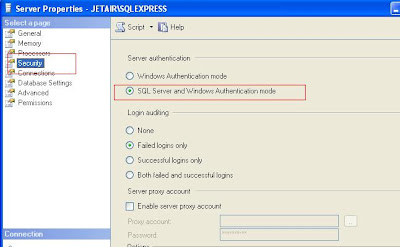

When we install Sql server 2005 during the installation it would prompt us for what kind of authentication mode to use (windows authentication or mixed mode[both sql and windows]), but at any point of time we can change this (similar to how we do it in sql2000) but with the new sql server management studio, the way we do it has slightly changed, this blog entry explains how to do the same.
1) Launch Sql Server Management Studio (SSMS), usually found in start > program files > Microsoft sql server 2005 > Sql Server Management Studio,
2) SSMS is nothing but a single IDE which combines both sql server 2000 enterprise manager and sql server 2000 query analyzer.
3) Since the mode is right now windows authentication, select the server type as "database engine" and then server name: the name of the sql server 2005 instance you are trying to connect to and authentication as "windows authentication" and click connect,
Note: If sql server 2005 is not yet started you may get an error msg (but in sql 2000 it used to start the sql server if it was not yet started but in 2005 it does not start it automatically).
4) Now the ssms will be connected, start the object explorer, several ways to start it, easiest is to press F8 or click on the icon in the menu which has the tool tip object explorer, (3rd from the right), object explorer is nothing but an tree view of all existing sql server instances, the databases and other agents (similar to sql 2000 enterprise manager left hand tree).
5) Right click on the sql server 2005 instance name and select properties to open the server properties popup window, in this window click on "security page" in the left hand side tree menu, and this page shows the server authentication, change it from windows authentication to sql server and windows authentication.
6) Now we need to perform one more additional step, configuring "sa" login or some other login and enabling it.
7) In the object explorer (F8) expand security, click on logins, the existing logins are shown in the right hand side, right click "sa" the default system administration login and select properties to show the properties window for "sa" login, here change the password of the login.
8) The main step is click on status page in the left hand side and change the status of the login to enabled (if not you will not be able to connect back using sa login)
Thus you can change the authentication modes in sql server 2005, but this may require a restart of the instance.
After restarting sql server 2005 try launching ssms and this time select mode as "sql server authentication" and enter login - "sa" and the password which you had changed in previous step and click "connect" and it should log you in.
Tags: Sql Server 2005, Sql Server,sql-server-2005Friday, March 02, 2007
Sql Server 2005 - A look at Installation : Instances
About Sql Server 2005 Instances: 
- More than one Sql Server 2005 can be installed on the same server, each installation is an instance,
- On the same machine you can have both Sql server 2000 and also Sql Server 2005 running side by side (like i do on my laptop),
- When you install Sql Server 2005 you are asked whether you want it to be installed as a default instance (no name for the instance) or you want to give it a name.
- During installation you can look at already existing instances as shown in the figure,
Why we need multiple instances?
- If you are planning to have a test environment and a production environment i would recommend installing Sql Server Developer edition on another pc and use it as a test environment, i do not like having test and production on the same OS box. Then why do we need multiple instance support? which is a great question, my answer is below,
- When you need to have multiple versions of sql server like 2000 & 2005 each run in their own instances,
- When you need to give admin or sa access to two different administrators to maintain their own sql servers,
- When you want to have another instance on the same OS where you can first test the service packs and ensure it works fine on the production OS and then do it to the other live instance,
- When you install other software like Vault or Sharepoint Portal Server 2007 or Visual Studio IDE 2005 they install their own instances of sql server 2005 or Sql Server 2005 Express editions.
SqlServer 2005 - About Sql 2005 & various editions
Sql Server 2005 is a robust database which is a version upgrade after 5+ years, the previous one was Sql Server 2000 and the one before was Sql Server 7.0

Microsoft spent 5 years to come up with this next release which has a lot of cool features,
Microsoft spent 5 years to come up with this next release which has a lot of cool features,
- Improvements in performance,
- More analysis tools,
- Integrated development with cool dot net IDE and management studio,
- CLR capabilities,
- Http end points,
- Support for service broker and SOA,
- Better Sql jobs control with the new Sql Agent,
- Database Snapshots feature,
- Great database mirroring,
- Log shipping feature,
- Replication improvements,
- and lots n lots of T-Sql and Sql improvements.
I have been working with Sql 2000 for the past 5+ years, and it is one of my favourite databases, i had previous experience working with My Sql and i used to wonder why such a robust database like Sql did not have some good features which mysql had at that time. Example: it had paging at the backend level, you can specify in a query itself how many rows you want, even oracle had pagenum but sql lacked it in 2000 sql server.
The new sql 2005 is very promising and has made up for all the lacking features.
Sql Server 2005 is shipped free with VS Dot net IDE as sql express edition, it comes with sharepoint portal server 2007 and a bunch of other dot net applications. Any developer should learn the new features of Sql server 2005 and my entries would be helpful in that regard.
Sql Server comes in 5 editions:
- Sql Server 2005 Enterprise edition,
- Sql Server 2005 Standard edition,
- Sql Server 2005 Work group edition,
- Sql Server 2005 Developer edition (free for development and testing, exactly like EE),
- Sql Server 2005 Express edition (free like former MSDE)
Best ways to learn sql server 2005:
1) Books online free download - http://www.microsoft.com/technet/prodtechnol/sql/2005/downloads/books.mspx
2) Free E-learning courses from Microsoft - (for a limited time it is free soon to end)
https://www.microsoftelearning.com/sqlserver2005/
http://www.microsoft.com/events/series/technetsqlserver2005.mspx
3) Official site - http://www.microsoft.com/sql/default.mspx
4) Cost in $$ for Sql server 2005 - http://www.microsoft.com/sql/howtobuy/default.mspx
5) Made up your mind try it for free (180 day evaluation) - http://www.microsoft.com/sql/downloads/trial-software.mspx
6) Edition comparisons - http://www.microsoft.com/sql/editions/enterprise/comparison.mspx
7) Post a comment on my blog, if i know the answer will let you know :)
Wednesday, February 21, 2007
Classic ASP (not ASP.Net) code debugging with VS Dotnet IDE 2005
I am not sure how many developers would need this but i needed it badly, i think i am the only one doing ASP coding and ASP.Net 2.0 coding at the same time :) So having used the 2005 IDE, you feel like your hand is broken when you go back to do classic ASP coding for old maintenance projects, where only way to debug is Response.Write but imagine how it would be if you can set breakpoint in classic ASP code and step in, step out F11, F10, Shift F11, F5 wouldn't it be great.
So i started my googling to find a solution which would make my daily coding life better and i was able to do it.
So here i am sharing my experience, "How to debug classic ASP using VS Dot net IDE 2005"
1) You need not have a sln or a project file, you can even open one single ASP file and debug it from top to bottom,
2) Open your ASP file in VS Dot net IDE 2005, then open IE and browse the page, this is done so that the ASP rendering process (IIS server but not aspnet_wp.exe, not w3wp.exe but dllhost.exe comes in to task manager),
3) Go to your default web site in IIS or your virtual directory >> right click properties >> home directory >> configuration >> Debugging tab >> in the debugging flags section,
check - Enable ASP server-side script debugging
In the script error messages section, check send detailed ASP error messages to client. (as shown in picture below).

So i started my googling to find a solution which would make my daily coding life better and i was able to do it.
So here i am sharing my experience, "How to debug classic ASP using VS Dot net IDE 2005"
1) You need not have a sln or a project file, you can even open one single ASP file and debug it from top to bottom,
2) Open your ASP file in VS Dot net IDE 2005, then open IE and browse the page, this is done so that the ASP rendering process (IIS server but not aspnet_wp.exe, not w3wp.exe but dllhost.exe comes in to task manager),
3) Go to your default web site in IIS or your virtual directory >> right click properties >> home directory >> configuration >> Debugging tab >> in the debugging flags section,
check - Enable ASP server-side script debugging
In the script error messages section, check send detailed ASP error messages to client. (as shown in picture below).

4) Now comes the important step, open your vsdotnet ide 2005, and open the single ASP page and click Debug >> Attach to process >> check the check box [ ] show processes from all users, then look for a process called dllhost.exe Type = x86, Script and the username running it is YOURPCNAME\IWAM_YOURPCNAME.

Click Attach and wait for few minutes and click ok, now go back to your ASP page place a break point and then refresh the IE, and you should see it stops at the breakpoint.
Happy Debugging ASP :)
Tuesday, February 20, 2007
VSDotnet IDE 2005 making use of IIS instead of development webserver
How to use IIS as the default web server instead of inbuilt ASP.Net development web server


When you create a new web project in VS dot net IDE 2005, by default it uses the inbuilt ASP.Net development web server for debugging and running,
So the URL will be something like,
http://localhost:2500 or a dynamic port,
So the URL will be something like,
http://localhost:2500 or a dynamic port,
This is actually the internal development web server. But for developers who are familiar with using IIS this may actually be a head ache. Also if you are using port 80 to code certain applications or using AJAX with 80 port then it may be tough to debug using fiddler or in general to stop and restart. So it is better to use IIS.
Listed below are the series of steps which you can easily do to change it to use IIS,
1) Create a virtual directory on IIS and point it to the folder where the source code resides, for example I use D:\drive instead of C:\inetpub\wwwroot, so i create a Virtual directory called "WebSite1" and point it to D:\proejcts\dotnet\website1\ = the folder where the sln file and the vbproj or csproj resides.
2) Right click on the virtual directory tab and go to properties in IIS and click on ASP.Net tab, in the dropdown change the dot net version from 1.1 to 2.0

3) Then open your VS dot net solution file and right click on your project >> go to property pages >> click on start options to see a screen like the one shown below,

In the above screen, select Use Custom server, Base URL: http://localhost/website1
Now try debug >> start without debugging, you will be using IIS to render the page. Though this is simple it takes few minutes to ponder this setting.
Tuesday, January 30, 2007
Sharepoint enable anonymous access and extranet sites
It is very common practice to create 2 sites one for intranet and one for extranet users and also enable anonymous access for extranet sites for certain pages and parts.
Unfortunately doing this is not a piece of cake in sharepoint and requires few manual interventions, here is an excellent article with snapshots which explains how to do this.
http://andrewconnell.com/blog/articles/HowToConfigPublishingSiteWithDualAuthProvidersAndAnonAccess.aspx
Unfortunately doing this is not a piece of cake in sharepoint and requires few manual interventions, here is an excellent article with snapshots which explains how to do this.
http://andrewconnell.com/blog/articles/HowToConfigPublishingSiteWithDualAuthProvidersAndAnonAccess.aspx
Wednesday, January 10, 2007
Dot Net 3.0 Question Bank for Interview Preparation / General Knowledge
My friend Sarath showed me this link today which has a huge collection of very well prepared question bank material.
Main point is it has lot of WCF WPF and Dot Net 3.0 questions.
Full eBook with 4000 .NET 3.0 ,C#, Ajax,JAVA,.NET and SQL ServerInterview questions
http://www.questpond.com/SampleInterviewQuestionBook.zip
Download the JAVA , .NET and SQL Server interview sheet and rateyourself.
This will help you judge yourself are you really worth ofattending interviews. If you own a company best way to judge if thecandidate is worth of it.
http://www.questpond.com/InterviewRatingSheet.zip
2000 Interview questions of .NET , JAVA and SQL Server Interviewquestions (worth downloading it)
http://www.questpond.com/InterviewQuestions.zip
Core Java and OOP's Interview questions
http://www.questpond.com/OOPsAndCoreJava.zip
Servlets / JSP Interview questions
http://www.questpond.com/ServletsJSP.zip
Architecture Interview Question
http://www.questpond.com/ArchitectureInterviewQuestions.zip
Project Management Interview questions must to read for all aspiringproject managers
http://www.questpond.com/ProjectManagementInterviewQuestions.zip
Full Address book application in C# with technical specification ,estimation and test cases
http://www.questpond.com/AddressbookProject.zip
Web services Interview questions
http://www.questpond.com/WebServicesAndRemoting.zip
SQL Server 2005 Database optimization Interview questions
http://www.questpond.com/DatabaseOptimization.zip
SQL Server 2005 DTS Interview questions
http://www.questpond.com/DTSInterviewQuestions.zip
SQL Server datawarehoue and Data mining Interview questions
http://www.questpond.com/DatawareHousingandDataMining.zip
SQLCLR Interview questions
http://www.questpond.com/SQLCLRInterviewquestion.zip
SQL Server XML Interview questions
http://www.questpond.com/SQLServerXML.zip
Basic .NET Framework interview questions
http://www.questpond.com/FrameWorkSampleInterviewQuestions.zip
..NET Interop and COM Interview questions
http://www.questpond.com/InteropdotnetInterviewQuestions.zip
ASP.NET Caching Interview questions
http://www.questpond.com/CachingInterviewQestions.zip
Localization globalization Interview questions
http://www.questpond.com/LocalizationAndGlobalization.zip
Do not know how estimations are done here's a complete book on it
http://www.questpond.com/HowtoPrepareSoftwareQuotations.zip
Main point is it has lot of WCF WPF and Dot Net 3.0 questions.
Full eBook with 4000 .NET 3.0 ,C#, Ajax,JAVA,.NET and SQL ServerInterview questions
http://www.questpond.com/SampleInterviewQuestionBook.zip
Download the JAVA , .NET and SQL Server interview sheet and rateyourself.
This will help you judge yourself are you really worth ofattending interviews. If you own a company best way to judge if thecandidate is worth of it.
http://www.questpond.com/InterviewRatingSheet.zip
2000 Interview questions of .NET , JAVA and SQL Server Interviewquestions (worth downloading it)
http://www.questpond.com/InterviewQuestions.zip
Core Java and OOP's Interview questions
http://www.questpond.com/OOPsAndCoreJava.zip
Servlets / JSP Interview questions
http://www.questpond.com/ServletsJSP.zip
Architecture Interview Question
http://www.questpond.com/ArchitectureInterviewQuestions.zip
Project Management Interview questions must to read for all aspiringproject managers
http://www.questpond.com/ProjectManagementInterviewQuestions.zip
Full Address book application in C# with technical specification ,estimation and test cases
http://www.questpond.com/AddressbookProject.zip
Web services Interview questions
http://www.questpond.com/WebServicesAndRemoting.zip
SQL Server 2005 Database optimization Interview questions
http://www.questpond.com/DatabaseOptimization.zip
SQL Server 2005 DTS Interview questions
http://www.questpond.com/DTSInterviewQuestions.zip
SQL Server datawarehoue and Data mining Interview questions
http://www.questpond.com/DatawareHousingandDataMining.zip
SQLCLR Interview questions
http://www.questpond.com/SQLCLRInterviewquestion.zip
SQL Server XML Interview questions
http://www.questpond.com/SQLServerXML.zip
Basic .NET Framework interview questions
http://www.questpond.com/FrameWorkSampleInterviewQuestions.zip
..NET Interop and COM Interview questions
http://www.questpond.com/InteropdotnetInterviewQuestions.zip
ASP.NET Caching Interview questions
http://www.questpond.com/CachingInterviewQestions.zip
Localization globalization Interview questions
http://www.questpond.com/LocalizationAndGlobalization.zip
Do not know how estimations are done here's a complete book on it
http://www.questpond.com/HowtoPrepareSoftwareQuotations.zip
Sunday, December 10, 2006
Microsoft Web Expression
Microsoft Web Expressions is a free IDE for building sophisticated dot net front end sites in 2.0 framework
http://www.microsoft.com/downloads/details.aspx?familyid=44FA7F93-7D57-4523-B0C9-2CE54397B732&mg_id=10053&displaylang=en
The tool can be downloaded from the above link.
http://www.microsoft.com/downloads/details.aspx?familyid=44FA7F93-7D57-4523-B0C9-2CE54397B732&mg_id=10053&displaylang=en
The tool can be downloaded from the above link.
Friday, November 17, 2006
More more more code samples :)
I remember the pepsi ad, "Yeh Dil Maange more!!" meaning, "this heart demands more" in Hindi (National language of India).
Similarly more code samples from .Net Framework 3.0
http://www.microsoft.com/downloads/details.aspx?FamilyID=22B58B6C-8F98-40D0-880D-C3339C5DA01E&displaylang=en&mg_id=10049
Overview
The Windows SDK samples for .NET Framework 3.0 include samples for .NET Framework 2.0, Windows Communication Foundation, Windows Presentation Foundation, Windows Workflow Foundation, and Cross Technology samples. These samples can be downloaded from here or are available when the Windows SDK is installed locally.
Similarly more code samples from .Net Framework 3.0
http://www.microsoft.com/downloads/details.aspx?FamilyID=22B58B6C-8F98-40D0-880D-C3339C5DA01E&displaylang=en&mg_id=10049
Overview
The Windows SDK samples for .NET Framework 3.0 include samples for .NET Framework 2.0, Windows Communication Foundation, Windows Presentation Foundation, Windows Workflow Foundation, and Cross Technology samples. These samples can be downloaded from here or are available when the Windows SDK is installed locally.
101 code samples for VS Dot net IDE 2005
One great thing about being and working in microsoft technologies is all that pampering you get via code samples, the videos, the code samples, if not there are usergroups and forums.
There is no need to break our heads for doing anything as some other person has already done something for you.
In that list, here is a list of 101 code samples for VS Dot net IDE 2005
http://msdn2.microsoft.com/en-us/vstudio/aa718334.aspx
Base Class Libraries - Group 1 Samples
The Base Class Library Group 1 samples show how to use the classes in the namespaces System.Net, System.RegEx, System.Transaction, System.Console and more. Samples include:
- Changing ACL (Access Control Lists) on files
- Console Enhancements including buffer control, simple animations and colors
- Downloading files using FTP (File Transfer Protocol)
- Network Programming including PING, UDP, and TCP network statistics
- Using the new Stopwatch class to measure time
- Compressing and decompressing files in the GZip format
- Retrieving Drive Information
- Using Generic Collections
- Creating Regular Expressions to parse text
Base Class Libraries - Group 2 Samples
The Base Class Library Group 2 samples show how to use the new classes and methods in the namespaces System.Net.Cache, System.Runtime.InteropServices, System.Net.Sockets.Socket and more. Samples include:
- Building a tracing infrastructure to track errors and application performance
- Controlling cache policies with the new System.Net.Cache namespace
- Creating a process viewer
- Creating a Windows service manager
- Using the data protection API
- Encrypting and decrypting data
- Using platform invoke to access legacy or unmanaged code from within managed code
- Building in support for localization
- Using the NGEN utility
- Using the new SecureString class
- Using new socket class methods
- Using serial ports with the new Port class
- Working with the file system
- Working with threads to manage multiple tasks simultaneously
- Building a simple web server with HTTPListener
Web Development Samples
The Web Development samples show how to use some of the new features of ASP.NET 2.0.
Windows Forms Samples
The Windows Forms samples show how to use some of the new functionality available to developers building desktop applications.
Visual Studio Tools for Office Samples
The Visual Studio Tools for Office (VSTO) samples show how to add functionality to Office applications like Word, Excel, InfoPath, and Outlook using the .NET framework and C# or Visual Basic.
Tablet PC Samples
The Tablet PC samples show how to create ink-enabled applications that utilize the power handwritten input with Tablet and Ultra Mobile Personal Computers.
.NET Compact Framework Samples
The .NET Compact Framework samples show how to use the new functionality found in Windows Mobile 5.0.
Friday, November 10, 2006
Sharepoint & MOSS 2007 Books
I found lot of useful books some FREE pdf & some by popular publications.
Here is a list, (will try to update it periodically keep checking my blog).
FREE STUFF:
1) Microsoft PDF - 7 Development projects with sharepoint
This one is free but you can only view it, you cannot print it.
Right click and save target as to save to your hard disk,
http://download.microsoft.com/download/0/2/f/02f0f661-88e1-43c2-b523-88d2e9e6802f/7%20Development%20Projects%20with%20the%202007%20Microsoft%20Office%20System%20and%20Windows%20SharePoint%20Services%202007.pdf
Publications:
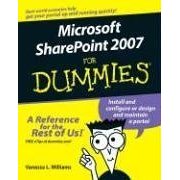
2) Microsoft SharePoint 2007 For Dummies (For Dummies (Computer/Tech)) (Paperback)
by Vanessa L. Williams
Hey dont laugh by looking at for dummies, they do have some great information.

Click here to Buy
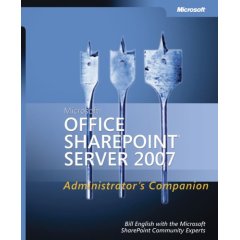
3) Microsoft Office SharePoint Server 2007 Administrator's Companion (Pro Resource Kit) (Paperback)
by Bill English, Microsoft Sharepoint Community Experts

Click here to buy
4) Microsoft SharePoint 2007 Development Unleashed (Paperback)
by Kevin Hoffman, Robert Foster

Click here to buy
BOOKS from Microsoft Press (wait for few more months to release) Still in the press :)
5) Inside Microsoft® Windows® SharePoint® Services Version 3
Author Ted Pattison; Daniel Larson
Pages 560
Disk 1 null
Level Int/Adv
Published 04/04/2007
ISBN 0-7356-2320-1

Click here to see details (still in Press)
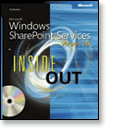
6)Microsoft® Windows® SharePoint® Services Version 3.0 Inside Out
Author Jim Buyens
Pages 800
Disk 1 Companion CD(s)
Level Int/Adv
Published 03/14/2007
ISBN 0-7356-2323-6

Click here to see details (still in Press will be out by Feb 28 2007)
7) The great step by step book
Microsoft® Windows® SharePoint® Services Version 3.0 Step by Step
Author Olga M. Londer, Todd Bleeker, Penelope Coventry and Bill English
Pages 368
Disk 1 Companion CD(s)
Level Beg/Int
Published 02/28/2007
ISBN 0-7356-2363-5

Still in press (will be released by Feb 28 2007)
Here is a list, (will try to update it periodically keep checking my blog).
FREE STUFF:
1) Microsoft PDF - 7 Development projects with sharepoint
This one is free but you can only view it, you cannot print it.
Right click and save target as to save to your hard disk,
http://download.microsoft.com/download/0/2/f/02f0f661-88e1-43c2-b523-88d2e9e6802f/7%20Development%20Projects%20with%20the%202007%20Microsoft%20Office%20System%20and%20Windows%20SharePoint%20Services%202007.pdf
Publications:
2) Microsoft SharePoint 2007 For Dummies (For Dummies (Computer/Tech)) (Paperback)
by Vanessa L. Williams
Hey dont laugh by looking at for dummies, they do have some great information.
Click here to Buy
3) Microsoft Office SharePoint Server 2007 Administrator's Companion (Pro Resource Kit) (Paperback)
by Bill English, Microsoft Sharepoint Community Experts
Click here to buy
4) Microsoft SharePoint 2007 Development Unleashed (Paperback)
by Kevin Hoffman, Robert Foster

Click here to buy
BOOKS from Microsoft Press (wait for few more months to release) Still in the press :)
5) Inside Microsoft® Windows® SharePoint® Services Version 3
Author Ted Pattison; Daniel Larson
Pages 560
Disk 1 null
Level Int/Adv
Published 04/04/2007
ISBN 0-7356-2320-1
Click here to see details (still in Press)
6)Microsoft® Windows® SharePoint® Services Version 3.0 Inside Out
Author Jim Buyens
Pages 800
Disk 1 Companion CD(s)
Level Int/Adv
Published 03/14/2007
ISBN 0-7356-2323-6
Click here to see details (still in Press will be out by Feb 28 2007)
7) The great step by step book
Microsoft® Windows® SharePoint® Services Version 3.0 Step by Step
Author Olga M. Londer, Todd Bleeker, Penelope Coventry and Bill English
Pages 368
Disk 1 Companion CD(s)
Level Beg/Int
Published 02/28/2007
ISBN 0-7356-2363-5

Still in press (will be released by Feb 28 2007)
Wednesday, November 08, 2006
Sharepoint Developer Videos
One great thing about microsoft is the amount of resources they spend on developing videos to learn their stuff.
There is a chinese proverb which says a picture can express thousand words, like that all these "How to........" series videos and lots of other how to code how to use sharepoint videos helps the developers.
There are more developer videos which a developer can download and see and learn, they are found at,
1) Videos on KPI, Web Parts,
Microsoft Office System Developers Conference 2006
Download this series of developer-oriented videos to view conference breakout sessions about building smart client and browser-based BI solutions leveraging a wide array of extensible capabilities, including key performance indicators, PivotTables, Web parts, and spreadsheet-based Web services.
http://www.microsoft.com/downloads/details.aspx?FamilyID=621566FD-A3D8-4628-A2CB-538CC173509F&displaylang=en
2) Videos on How to serieshttp://www.microsoft.com/downloads/details.aspx?familyid=AAFBC288-9F1E-4398-AE06-617CEFEC5823&displaylang=en
3) Videos on Collaboration Tools:
Microsoft Office System Developers Conference 2006
Download this series of developer-oriented videos to view conference breakout sessions about how developers can use the 2007 Microsoft Office system to create powerful collaboration tools.
http://www.microsoft.com/downloads/details.aspx?familyid=029706C1-F20E-4BD1-99BB-78810E16F3D8&displaylang=en
4) Videos on Enterprise Content ManagementMicrosoft Office System Developers Conference 2006
Download this series of developer-oriented videos to view conference breakout sessions about the new, extensible content management
http://www.microsoft.com/downloads/details.aspx?familyid=562B9B75-55B7-4F5D-AFE4-1F78C8B7FC6D&displaylang=en
5) Videos on Portal Customization
Microsoft Office System Developers Conference 2006
Download this series of developer-oriented videos to view conference breakout sessions about customizing search capabilities, building custom portal interfaces, providing personalized views, and aggregating connections to line-of-business data.
http://www.microsoft.com/downloads/details.aspx?familyid=5EC4193A-8061-4FD8-8CA4-574540049FE9&displaylang=en
6) Videos on Business Intelligence
http://www.microsoft.com/downloads/details.aspx?familyid=AAFBC288-9F1E-4398-AE06-617CEFEC5823&displaylang=en
There is a chinese proverb which says a picture can express thousand words, like that all these "How to........" series videos and lots of other how to code how to use sharepoint videos helps the developers.
There are more developer videos which a developer can download and see and learn, they are found at,
1) Videos on KPI, Web Parts,
Microsoft Office System Developers Conference 2006
Download this series of developer-oriented videos to view conference breakout sessions about building smart client and browser-based BI solutions leveraging a wide array of extensible capabilities, including key performance indicators, PivotTables, Web parts, and spreadsheet-based Web services.
http://www.microsoft.com/downloads/details.aspx?FamilyID=621566FD-A3D8-4628-A2CB-538CC173509F&displaylang=en
2) Videos on How to serieshttp://www.microsoft.com/downloads/details.aspx?familyid=AAFBC288-9F1E-4398-AE06-617CEFEC5823&displaylang=en
3) Videos on Collaboration Tools:
Microsoft Office System Developers Conference 2006
Download this series of developer-oriented videos to view conference breakout sessions about how developers can use the 2007 Microsoft Office system to create powerful collaboration tools.
http://www.microsoft.com/downloads/details.aspx?familyid=029706C1-F20E-4BD1-99BB-78810E16F3D8&displaylang=en
4) Videos on Enterprise Content ManagementMicrosoft Office System Developers Conference 2006
Download this series of developer-oriented videos to view conference breakout sessions about the new, extensible content management
http://www.microsoft.com/downloads/details.aspx?familyid=562B9B75-55B7-4F5D-AFE4-1F78C8B7FC6D&displaylang=en
5) Videos on Portal Customization
Microsoft Office System Developers Conference 2006
Download this series of developer-oriented videos to view conference breakout sessions about customizing search capabilities, building custom portal interfaces, providing personalized views, and aggregating connections to line-of-business data.
http://www.microsoft.com/downloads/details.aspx?familyid=5EC4193A-8061-4FD8-8CA4-574540049FE9&displaylang=en
6) Videos on Business Intelligence
http://www.microsoft.com/downloads/details.aspx?familyid=AAFBC288-9F1E-4398-AE06-617CEFEC5823&displaylang=en
Tuesday, November 07, 2006
Blog of Eric Legault - sharepoint / outlook MVP
Eric is an outlook MVP and also is a specialist using Sharepoint 2007 collaborative workspaces and meeting workspaces.
His MVP profile - http://aspnet2.com/mvp.ashx?EricLegault
His personal website - http://www.collaborativeinnovations.ca/
His Sharepoint blog - http://blogs.officezealot.com/legault/
His MVP profile - http://aspnet2.com/mvp.ashx?EricLegault
His personal website - http://www.collaborativeinnovations.ca/
His Sharepoint blog - http://blogs.officezealot.com/legault/
Subscribe to:
Posts (Atom)


